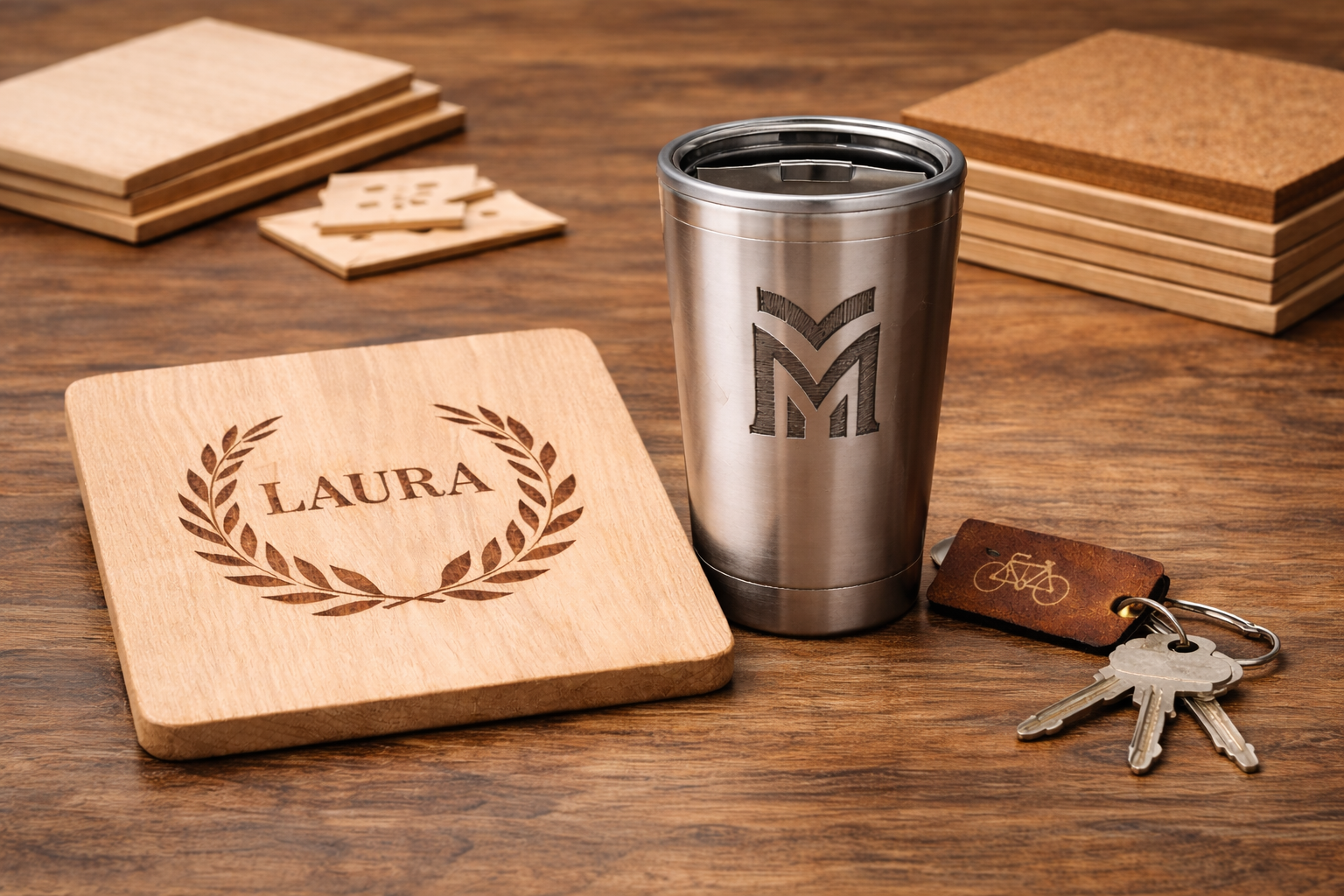
Custom engraving is the process of adding personalised designs, names, or patterns to materials like wood, metal, glass, or plastic. Hobbyists and small business owners often wonder if this one-off style of production can grow into a larger operation. The good news is that modern tools and workflows make it much easier to handle more custom engraving jobs. At the same time, there are practical limits in terms of time and equipment. This article looks at what makes engraving custom, how technology and planning can help, and what challenges to expect when scaling up.
What Makes Engraving “Custom”?
Every custom engraving job is unique. You might engrave a customer’s name on a wooden plaque, a logo on a tumbler, or a design on a leather jacket. Each item may need a new design file or a different machine setting. This personal touch is the appeal of custom engraving. However, it also means no two jobs are exactly the same. In traditional manufacturing, you make many copies of the same product. In custom work, each piece could be different, which can slow down production if not managed carefully.
For example, engraving a single name on wood is usually quick. But designing a new intricate pattern for each item takes extra time. Beginners might think this means engraving can only handle a few orders at a time. In reality, small businesses use digital tools and smart workflows to serve dozens or hundreds of customers. The key is to organize and automate as much as possible, so that many “custom” jobs can still be processed efficiently.
Technology Helps Scale Engraving
Advances in engraving technology have made it much easier to scale up. Modern laser engravers and CNC machines can run continuously and reproduce precise designs. They come with software that imports vector graphics or text, so you don’t need to redraw designs by hand for each order. Many machines even let you save templates or presets (such as name tags or standard logos) and just swap out the custom parts.
- Power and Speed. A powerful laser machine runs faster than a hobby-grade one. For example, a 50-watt CO2 laser can engrave wood or acrylic much faster than a 5-watt diode laser. Fiber lasers (for metal) can etch logos on steel in seconds, whereas an under-powered laser might take much longer. Choosing the right type of laser for your material (fiber for metals, CO2 for wood/acrylic, etc.) avoids wasting time with slow settings.
- Batch Attachments. Some tools let you engrave multiple items at once. For cylindrical objects like water bottles or wine glasses, you can use a multi-rotary attachment or fixture that holds several pieces. This way, you hit “start” and the machine engraves six tumblers in one run instead of one by one. This requires planning, but it can dramatically increase output.
- Consistent Results. Machines produce uniform quality on every piece, which is a big advantage over hand engraving. This consistency means you spend less time checking and correcting each item. You can also reuse popular designs without reworking them from scratch. Once a design is proved, the engraver will replicate it exactly each time.
Using templates and design software is another big help. For example, if you sell custom cutting boards with names, create a template that includes the usual layout and font. Then for each order, you only change the text. This reduces design time and lets one person handle dozens of orders a day. Free vector programs or layout tools can make this step fast. The faster you can go from order to machine-ready file, the more jobs you can fit into a day.
Streamlining Workflow and Orders
How you organize orders has a big effect on scalability. Here are some strategies that small businesses use:
- Group Similar Jobs. Schedule your work by material and design type. For example, engrave all wooden plaques together, then switch to metal keychains. This way you only set up the machine (focus, speed, material loading) once for a batch, instead of adjusting it for each different job. Grouping reduces downtime between jobs.
- Digital Order Tracking. Keep a simple spreadsheet or use shop software to track each order’s details (text, artwork, size). That way you avoid retyping information for the machine. Some makers use online forms where customers enter their names or text, and it goes straight into the design file. This cuts errors and saves time on data entry.
- Quality Checks. Even in volume, make sure each item is tested. It can be a quick test mark or engraving on a scrap piece. Catching a mistake early (like a wrong font or alignment) saves fixing or redoing it later. At scale, small delays compound, so consistent quality control keeps production running smoothly.
- Machine Maintenance. High-volume work wears out parts faster. Keep your engraver clean and well-maintained to avoid unexpected downtime. For example, wipe lenses, empty debris trays, and replace worn belts or nozzles on schedule. A little routine care keeps the machine running at full speed, which is essential when you need high throughput.
Realistic Limits to Consider
Even with the best workflow, custom engraving has physical limits. Understanding them helps set realistic expectations:
- Time per Item. Every design takes time. A small text engraving might only take 10–20 seconds on a fast machine, but a larger or more detailed design can take a minute or more. Multiply that by the number of items per order, and you see how quickly hours add up. Plan for design complexity: if orders get too detailed, consider simplifying art or charging more for extra work.
- Machine Speed. Most small lasers move at speeds from a few hundred up to a couple thousand millimeters per second when engraving. Faster speeds or more power let you do more in an hour. Some advanced machines use mirror systems (galvos) to very quickly move the beam, which is great for metal. A basic gantry-style laser (the bed moves in X-Y) is simpler but slower. Know your machine’s typical time-per-job so you can estimate daily capacity.
- Labor and Hours. One person can only load and unload as fast as one machine. If demand spikes, consider another shift or an assistant. Some shops run 8–16 hours a day when busy. If you want to scale further, you might add a second machine. This doubles production but also doubles costs like power and space. Outsourcing some work (for example, subcontracting engraving for overflow orders) is also an option for very high demand.
- Material and Inventory. Ensure you have enough blanks (wood pieces, metal tags, etc.) in stock to meet orders. Running out of stock can halt production. Buying in bulk can reduce per-piece cost, but check storage space and shelf-life of materials. Also factor in time to load materials into the machine or onto fixtures – preparing hundreds of items takes labor.
- Cost vs. Price. Engraving itself has low material cost (usually just the blank and electricity), but the machine is a fixed expense. To scale profitably, the price per item should cover machine time and overhead. Many engraved goods have high markups since people pay for the custom service. However, if you scale too fast without sufficient orders, you may end up with underused machines. Growing steadily helps match costs to income.
Myths and Misconceptions
There are some common myths about custom engraving and scaling:
- Myth: “Custom means you can’t scale.” In reality, many shops successfully do small-batch custom work every day. By treating custom jobs like any production step and using digital tools, you can serve many customers. It’s a form of “mass customization,” where modern systems make each product unique without extreme slowdowns.
- Myth: “You need a factory to grow.” While large factories can handle huge volumes, even small businesses can expand. For example, a solo engraver might start part-time and then buy a second, faster machine when orders double. The key is reinvesting profits into capacity. Scale doesn’t have to jump from one job to thousands overnight.
- Myth: “Quality will drop if I do many orders.” Machines ensure quality stays the same. If you use consistent settings and testing, each piece will look as good as the last. Actually, engaging in more work often leads shops to improve processes (like creating checklists) that maintain quality better than a casual setup.
Practical Tips for Scaling Up
- Automate Routine Tasks. Use software or scripts to fill in customer data (names, dates) into your engraving layouts. Even simple mail-merge tools can speed up text replacements. This way the operator only needs to load a design template and confirm settings.
- Use Multiple Machines Strategically. You don’t need to get all your profit out of one laser. If one machine is at capacity, adding another identical unit can double output. You can also mix machine types: keep one for metal and one for wood, for example, so you’re not constantly swapping setups.
- Optimize Your Workspace. Arrange your workshop so that moving items from order to finished product flows smoothly. For instance, have a storage bin for clean blanks near the machine, a marking station for unfinished pieces, and an assembly or packing station nearby. This avoids time wasted walking around or searching for materials.
- Keep Learning. As demand grows, you’ll find ways to cut minutes off each job. Perhaps you discover a faster focus height, a quicker software workflow, or a new engraving tip. Even training yourself (or staff) to run machines steadily helps increase throughput. Small time savings on each job add up over hundreds of pieces.
- Set Clear Lead Times. Let customers know how long it will take when you receive more orders than usual. It’s better to under-promise and over-deliver. If you find lead time stretching, it’s a sign you may need to slow down new sales or speed up production through any of the steps above.
Key Takeaways
- Custom engraving can grow beyond a hobby into a larger operation with the right setup.
- Modern lasers and CNC machines, along with digital design templates, make it easier to handle many orders.
- Physical limits (like engraving time and labour) still apply. You increase capacity by adding machines, shifts, or streamlining workflow.
- Planning and organisation are crucial. Group similar jobs, maintain your equipment, and use order-tracking tools.
- Scaling is a step-by-step process. Start small and reinvest in better tools and processes as demand rises. Even beginners can gradually expand a custom engraving service into a scalable business.
MakerMyths Tools
- MakerMyths Engraving Time Calculator (coming soon, free) – Estimate how long your custom engraving jobs will take based on material and machine speed.
- MakerMyths Order Tracker (coming soon) – A simple tool to organise your custom order details, track status, and ensure nothing is missed in production.
- MakerMyths Integration Platform (coming soon) – A professional suite that will help connect online orders and design data directly with your engraving setup for seamless scaling.